OPC-UA Server
Characteristics
OPC (Open Platform Communications) enables access to machines, devices and other systems in a standardized way. To learn more about the standard visit the OPC-UA website.
Supported features
Data Access
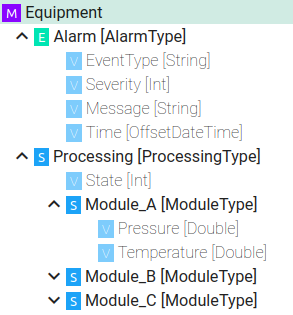
Information Model Requirements
The following Node Types can be used to model data structures:
Variables
 with a Simple Data Type.
Variables
with a Custom Data Type.
Configuration
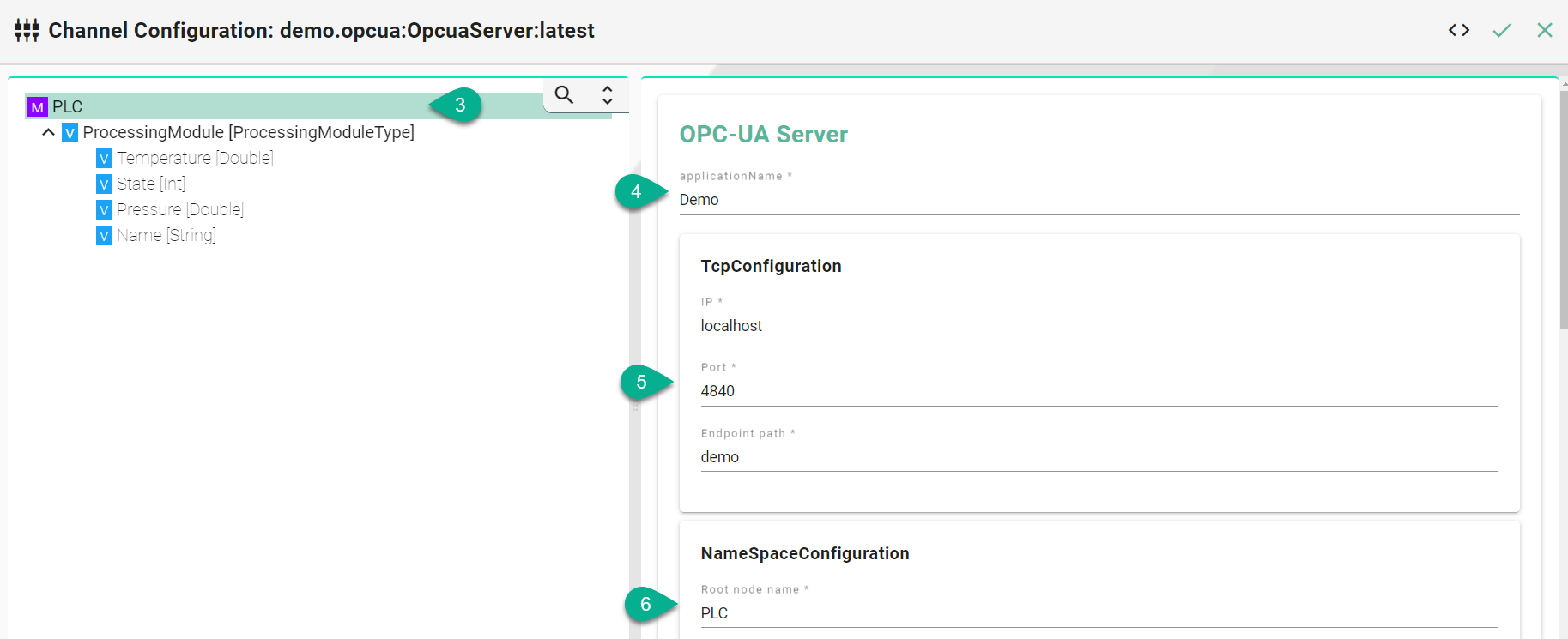
Select OPC UA Server as Channel Type.
Click the Configure button.

Make sure the root model node is selected to configure the OPC-UA Server
Enter an application Name
Configure TCP
Enter an Ip Address
Enter the Port
Define an Endpoint
Configure the NameSpace
Provide a Root node name
Configure the variable sampling interval
Set the Initial delay in milliseconds
Input the Sampling rate in milliseconds

Description of configuration properties:
Property |
Description |
Example |
|---|---|---|
IP Address |
Server IP |
|
Port |
Server port |
|
Endpoint path |
Service name at the server endpoint |
|
Root node name |
The name of the top-level node in the OPC UA server's address space |
|
Initial delay |
The time the OPC UA client/server should wait before attempting to connect to the OPC UA server |
|
Sampling rate |
The rate at which the OPC UA client/server requests data from the OPC UA server |
|