SMARTUNIFIER User Manual

About SMARTUNIFIER
You are new to SMARTUNIFIER?
Learn about the SMARTUNIFIER connectivity platform
Learn about the connectivity use cases you can address with SMARTUNIFIER
Get started with your integration
Installation
Overview
Installing SMARTUNIFIER on a host is the first step in realizing your connectivity scenario. There are three ways you can install and operate SMARTUNIFIER:
Install the SMARTUNIFIER installation package on your operating system
See the system requirements prior to the installation
Amorph Systems supports using SMARTUNIFIER on the following operating systems:
Install SMARTUNIFIER in an containerized environments using Docker
SMARTUNIFIER Setup
Before using SMARTUNIFIER Manager it is recommended to have a look over the following setup options:
How to integrate with SMARTUNIFIER
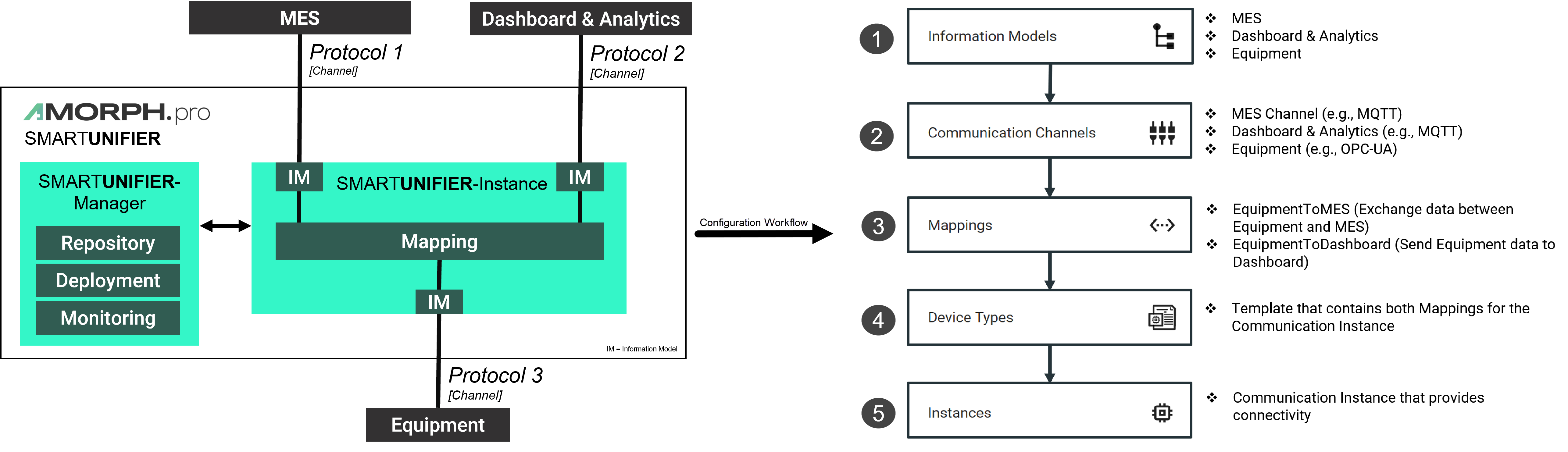
Each integration scenario follows the same workflow, which consists out of 5 steps:
Information Models - describe and visualize communication related data using hierarchical tree structures
Communication Channels - describe and configure the protocols needed for the scenario
Mappings - define when and how to exchange/transform data between Information Models
Device Types - define templates for Instances
Instances - define applications that provide the connectivity
Below you can see an example of integration scenario and the necessary steps to establish connectivity with SMARTUNIFIER:
Configuration Component Management
SMARTUNIFIER provides a comprehensive management of the configuration components:
In order to keep the SMARTUNIFIER configuration components organized take a look on how to name the configuration components.
Deployment
SMARTUNIFIER supports the deployment of Instances on several computing environments:
Local - on the same environment the SMARTUNIFIER Manager is running on
Agent Process - remote on any machine
Learn how to operate and monitor your SMARTUNIFIER Instances.
Learn about notifications.
Learn about additional deployment options.
Administration
Learn how to:
Integrate an Active Directory
Manage Communication Channel Types
Manage Docker Java Images
Create Deployment Endpoints
Manage Credentials
Manage User Accounts
Manage Logging Configurations
Create Alerts
Manage Alert Channels
Use Extensions
Validate the Configuration Components
Getting Help
Having trouble? We would like to help!
In case of malfunctioning SU Instances check out the Troubleshooting section
Try the FAQ - it’s got answers to regularly asked questions
Check out the Glossary if some terminology is not clear