REST
Characteristics - REST
Representational state transfer (REST) is a software architectural style that describes a uniform interface between decoupled components in the Internet in a Client-Server architecture. To learn more about the standard visit the REST section in Wikipedia website.
The characteristics of a REST server that need to be configured typically include the following:
Host and Port: The network address (IP or hostname) and port number on which the server listens for incomming HTTP requests.
Base URL/Context Path: The root path under which the REST API is accessible (e.g. /api/v1).
SSL/TLS (HTTPS): Certificates and protocols used for secure communication.
Message Encoding: The character encoding used for the body of HTTP requests and responses.
Timeouts: Limits for request processing time, connection time, etc.
Endpoint/Routes: The specific URI’s and HTTP methods (GET, POST, PUT, DELETE, etc.) that the server will handle.
Thread Pool/Concurrency Settings: Limits for the number of concurrent requests the server can handle.
Configuration - REST Server
To configure a REST server in SmartUnifier, a few core concepts should be understood:
Information Model: defines the structure of resources on the server but also detailed configuration of the endpoints/routes (Parametes, Headers, Body structure). In the current version of SmartUnifier only Variables, Complex Variables and Commands can be used for REST server configuration.
Communication Channel: specifies how the defined structure will be communicated to clients.
Variables and Complex variables can be used together with the rest server as storage for data. For example you have an equipment with all kind of data points like temperature, pressure, etc., these data points can be stored in a complex variable and the rest server can be configured to return the data in a structured way.
Commands can be used to execute actions on the server. Command parameters can be used as headers, url parameters or body content. Command reply can be used retrieve the return code, headers and body of the executed command.
General REST Server channel configuration:
Property |
Description |
Example |
|---|---|---|
pathPrefix |
root path under which the REST API is accessible |
|
IP |
The IP address of the REST server |
|
Port |
The port of the REST server |
|
Default content type |
The default content type of the REST server. Default value is application/json. |
|
Webapp |
When enabled the REST server will be able to be configured to host a web application. |
|
SSL |
When enabled the REST server will be able to be configured to use SSL encryption. |
|
Message encoding |
Encoding standard for messages |
|
Maximum Handling Time in ms |
||
Log data |
Show message body in logs |
|
Threadpool size |
Number of threads that should handle incomming requests |
|
Webapp configuration
Property |
Description |
Example |
|---|---|---|
Warfile |
The path to the WAR file of the web application. |
c:/helloworld.war |
Context path |
The path where the web application can be accessed. |
/webapp/helloworld |
SSL configuration
Property |
Description |
Example |
|---|---|---|
Keystore |
Select to specify where are the SSL certificates stored. |
Java Certificate Keystore or Windows Certificate Management |
Truststore |
Select to specify where are the trusted certificates stored. |
Java Certificate Keystore or Windows Certificate Management |
Port |
Optional configuration to specify https port in case http and https are both enabled |
9445 |
Java Certificate Keystore configuration
Property |
Description |
Example |
|---|---|---|
Keystore file path |
The path to the Java KeyStore file. |
|
Password |
The password for the Java KeyStore file. |
|
Note
To create a test certificate in the Java Certificate Keystore, use the following commands: (change all entries within ’ ’ to match your specifics)
SmartUnifierManager\jre\bin\keytool.exe -genkeypair -keyalg RSA -keysize 2048 -keystore keystore.jks -alias SmartUnifier3 -dname "CN='smartunifier-https-vhost',OU=amorph.pro,O=Amorphsys,C=DE" -storepass 'changeit' -keypass 'changeit' -validity 3650 -ext KeyUsage=digitalSignature,dataEncipherment,keyEncipherment,keyAgreement -ext ExtendedKeyUsage=serverAuth,clientAuth
SmartUnifierManager\jre\bin\keytool.exe -v -list -keystore keystore.jks -storepass changeit
Windows Certificate Management configuration
Property |
Description |
Example |
|---|---|---|
Certificate Name (optional) |
The name of the certificate to use. |
|
Type |
Specifies in which windows store the certificate is located. |
Current User MY |
Provider |
Specifies the cryptographic service provider (CSP) to use for certificate operations. |
|
There are 4 supported stores where the certificate can be placed:
Local Machine MY Stores certificates and private keys accessible to all accounts on the system.
Local Machine ROOT Contains root CA certificates and trusted self-signed certificates accessible to all accounts on the system.
Current User MY Stores personal certificates and private keys accessible only to the current user.
Current User ROOT Contains root CA certificates and trusted self-signed certificates accessible only to the current user.
Note
To create a test certificate in the Windows Certificate Store, use the following PowerShell command:
New-SelfSignedCertificate -DnsName localhost -CertStoreLocation cert:\LocallMachine\Root
Note
Because this certificate is stored in Local Machine MY, you need to run the SMARTUNIFIER as an Administrator to access it.
Variable and Complex Variable configuration
No configurations are needed for the variable and complex variable nodes. Server will automatically create routes based on the pathPrefix and variable path. E.g. if the pathPrefix = /api/v1 and the variable is created in the root of the information model, with the name temperature, the route will be /api/v1/Variable/temperature. If the variable is created under the Measurements complex variable, the route will be /api/v1/Variable/Measurements/Variable/temperature. But also /api/v1/Variable/Measurements route will be available. For both variable types GET, PUT, POST methods will be available.
Command configuration
By default commands are disabled. To enable commands you have to select it in the channel configuration from the information model tree. By checking the “Command routed” you enable that command. If no other configuration is done a default route will be created based on the pathPrefix. E.g. if the pathPrefix = /api/v1 and the command is created in the root of the information model, with the name getTemperature, the route will be /api/v1/Command/getTemperature. As for the variables GET, PUT, POST methods will be available.
Command configuration details
Property |
Description |
Example |
|---|---|---|
URL |
URL of the REST API. URL is relative to the pathPrefix |
|
HttpMethod |
HTTP method for the action performed by the Client. |
|
Content Type |
Is used to indicate the media type of the resource. Default value is |
|
reply content type |
Is used to indicate the media type of the reply. Default value is |
|
Configuration - REST Client
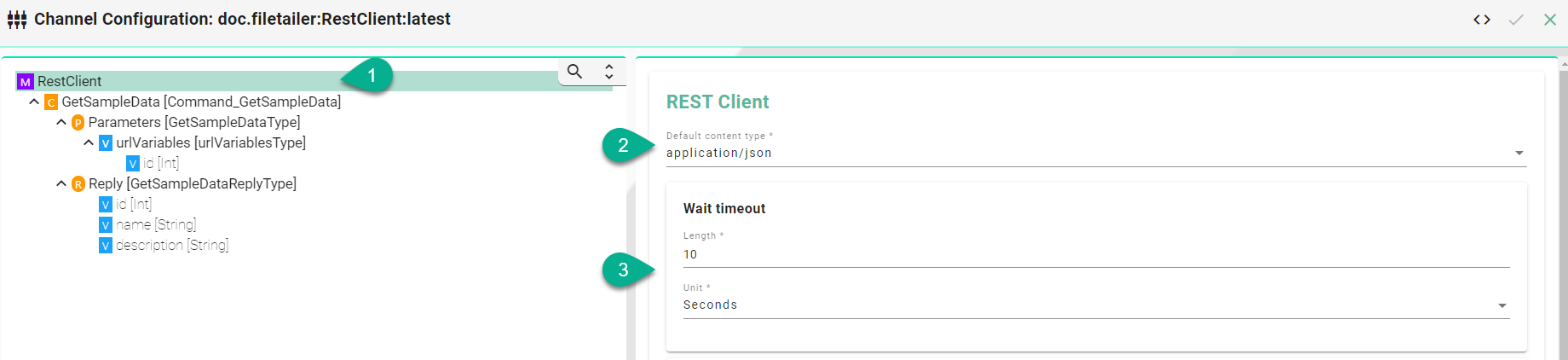
The following sample configuration shows a GET request using url parameters.
Select the root model node in the tree on the left
Select the content type - defines the media type of the associated representation
Set the wait timeout
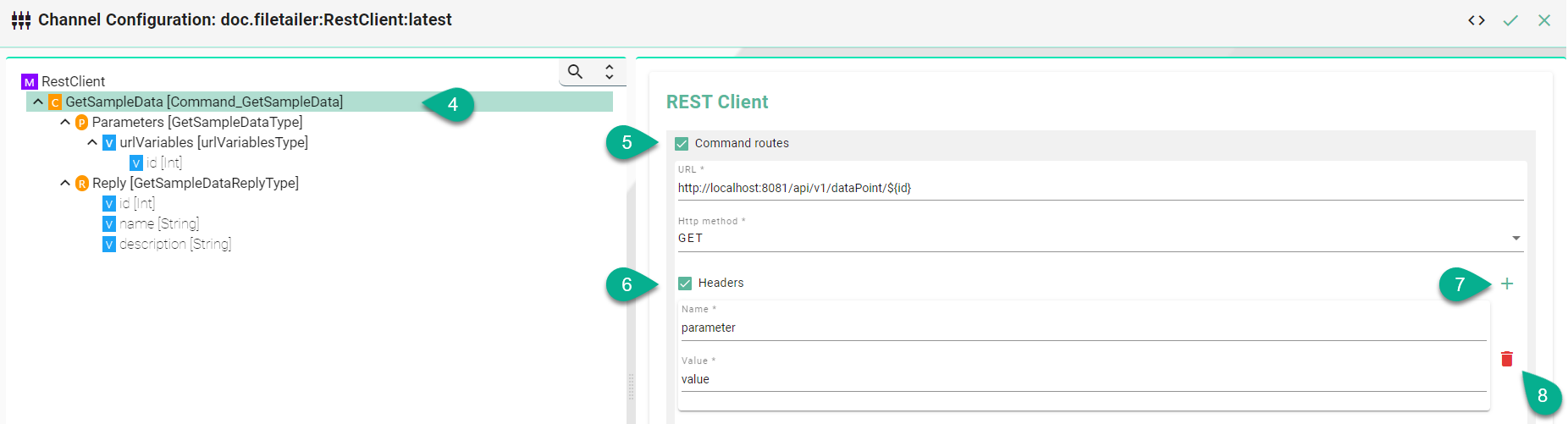
Select the Command node
Enable the Command routes checkbox for the configuration of the following fields:
Enter the URL - If URL parameters are used then add each parameter in the following syntax
${id}Select the HTTP method.
Headers (Optional) - Enable the checkbox Headers for the configuration of the following fields:
Enter the name of the header
Enter the value
Add multiple header entries by clicking the Add button
Delete a header by clicking the Delete button
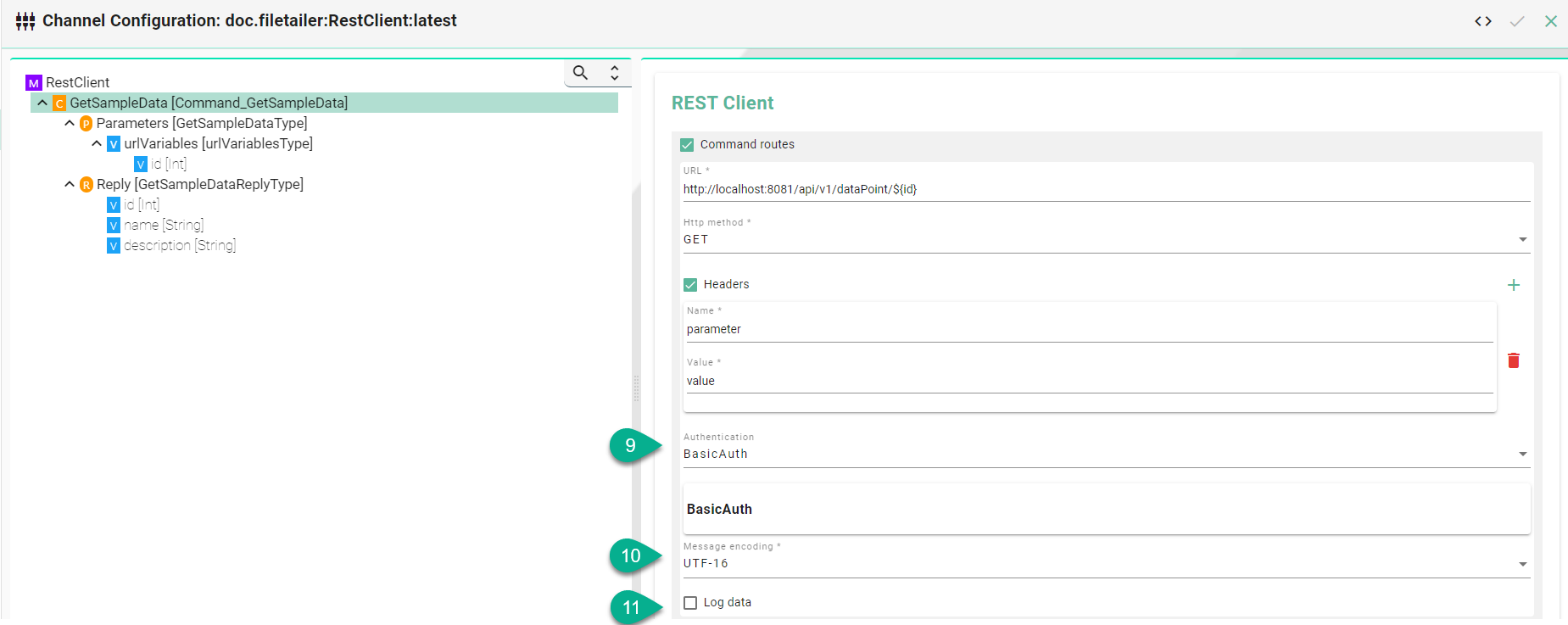
Select the Authentication type
Select the Message encoding standard
Check the box to Log data (E.g., the body of a request).
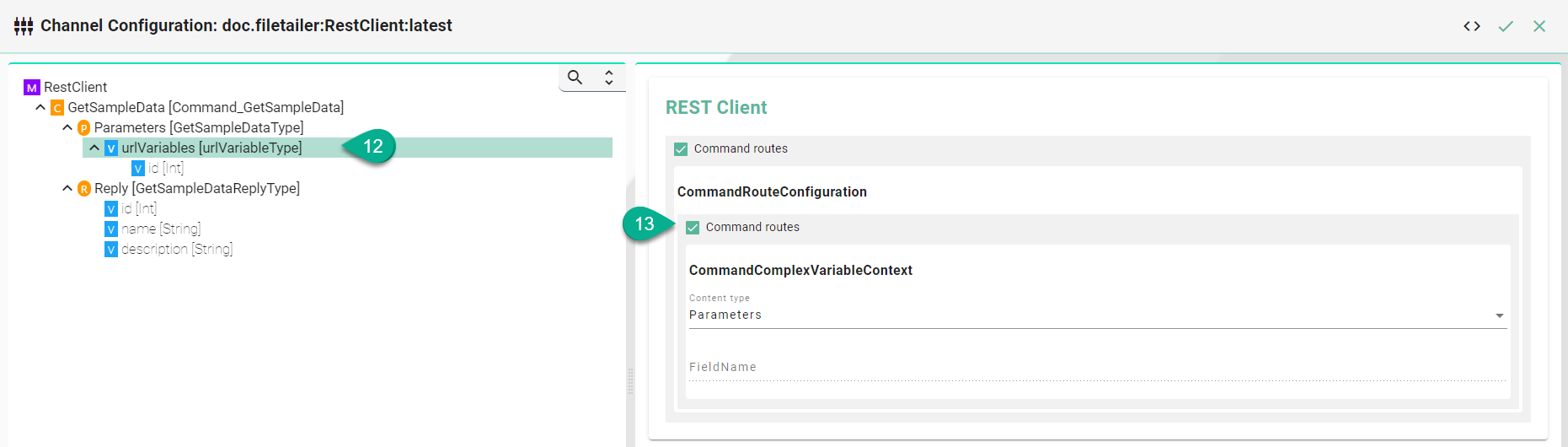
URL Parameters (Optional) - Select a custom variable node
Enable the Command routes for the configuration of the following fields:
Select the Content Type
(Optional) Enter a Field Name in case the Information Model Node is not matching the REST API
Description of configuration properties:
Property |
Description |
Example |
|---|---|---|
URL |
URL of the REST API. |
|
HttpMethod |
HTTP method for the action performed by the Client. |
|
HeaderName and Header Value |
To provide server and client with additional information |
|
Default Content Type |
Is used to indicate the media type of the resource. |
|
RouteHeaderConfiguration |
Headers represent the meta-data associated with the API request |
|
Authentication Type |
Type of the Authentication |
|
Content Type of Parameter Nodes |
Type of the Parameter |
|
Field Name |
For non-matching Information Model nodes and API spelling |
|
WaitTimeoutDuration |
Timeout in seconds until request is failing |
|
Message encoding |
Encoding standard for messages |
|